
Once you start working with real-world data, you quickly realize something important: no information lives alone.
Customers are in one table, orders in another, products in another… and you need to connect all of them to answer meaningful questions.
That’s exactly where one of SQL’s most powerful tools comes in: the JOIN clause.
A JOIN simply combines rows from two (or more) tables based on a shared column. There are several types of JOINs, and each one returns a different “slice” of the relationship between the tables.
Below is a direct, practical guide with clear examples for each type.
INNER JOIN — only the matching records
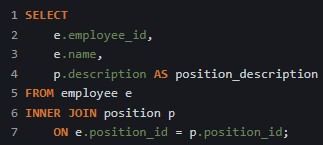
INNER JOIN is used when we want to return only the entries that exist in both tables. For a row to appear in the result of an INNER JOIN operation, it must have a matching value in both tables.

Imagine the following example: in a company’s database, there are two tables with the following fields — employee (employee_id, name, position_id) and position (position_id, description). Now imagine you want to see each employee’s name alongside the description of their position. You can do that with the following SQL query:
LEFT JOIN — everything from the left table + matching records from the right
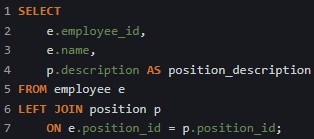
The LEFT JOIN command allows us to retrieve all rows from the left table. This means that even if there are no matching values in the right table, every row on the left will still appear in the result — with the corresponding values from the right table included when they exist.

For example, imagine there are employees with no assigned position. If we want to display all employees (including those without a position), while still showing the position description whenever available, we can use the following query:
RIGHT JOIN — the opposite of LEFT JOIN
RIGHT JOIN is used when you want to keep all the rows from the right table, regardless of whether they have matching entries in the left table.
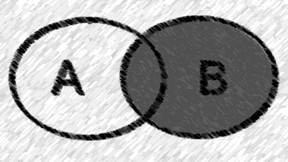
Use it when you want all positions, even those that aren’t associated with any employee.
FULL JOIN — everything from both tables
This type of JOIN is used when you want to return all rows from both tables.

In our example, every employee and every position will be included in the result, even when there is no matching entry in the other table.
When using INNER JOIN or FULL JOIN, the order of the tables does not affect the result. However, with LEFT JOIN and RIGHT JOIN, the order matters and must be taken into account.
Final Thoughts
JOINs are foundational for SQL. They allow you to connect information across tables, build richer queries, and analyze your data with clarity and precision.
If you already feel comfortable with SELECT and WHERE, learning JOINs is the next step to level-up your SQL skills — and your data analysis capabilities.
 The Data Viewfinder
Leave a comment