
We’ve already talked about primary and foreign keys, the foundations of any relational database. Now it’s time to look at two closely related topics: DELETE CASCADE and Triggers.
When working with a relational database made up of multiple interconnected tables, it’s common to want to remove not just one record, but all the related records across different tables. That’s exactly what DELETE CASCADE is designed for. This rule is defined directly in the foreign key of a table. Once a record is deleted in the parent table, every related record in the child table is automatically removed as well. It’s a fast, consistent, and predictable way to keep your database synchronized.
When a table has two or more foreign keys, and only one of the corresponding primary keys has DELETE CASCADE enabled, deleting a record from that parent table will also delete the related record in the child table. The other foreign keys (set to NO ACTION) do not block this deletion. However, if the record you delete belongs to a parent table without DELETE CASCADE, then the child row will not be removed.
Say we have three tables: two parent tables called Products and Customers, and one child table called Orders, defined as follows:
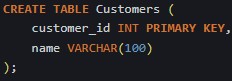


Whenever we delete a record from the Customers table, the corresponding record in the Orders table will be automatically removed. The same is not true for Products, since the product_id key does not have DELETE CASCADE enabled.
DELETE CASCADE is an easy way to automate data removal, preventing records from ending up without corresponding values in related tables. But we also have another tool that offers even more flexibility when handling data: the Trigger.
Triggers
A trigger is an automated procedure in a database that runs whenever a specific event happens on a table or view. These events can be an insertion (INSERT), an update (UPDATE), or a deletion (DELETE).
Triggers are often used to enforce data integrity, automate tasks like cascading updates, or keep audit logs. In short, they give you much more control over what happens behind the scenes each time your data changes.
Triggers can also be categorized by how they are fired and executed inside a database system:
Row-level triggers:
These are triggered once per row affected by the operation. If an INSERT, UPDATE, or DELETE touches ten rows, the trigger will run ten times. They’re useful when you need to enforce business rules or audit changes at the row level. Row-level triggers can be defined to run either before or after the operation happens.
Statement-level triggers:
These fire only once per statement, no matter how many rows are involved. Even if an update affects thousands of rows, the trigger runs just a single time. They’re ideal for tasks that operate on whole result sets or when performance matters, since they are generally more efficient than row-level triggers.
When DELETE CASCADE is not enough
DELETE CASCADE is “all or nothing”: if it’s enabled on a foreign key, all child rows linked to that parent are deleted when the parent is deleted. You can’t add conditions like:
- “Delete only draft orders”
- “Keep completed orders for accounting”
- “Instead of deleting, move the data to an archive table”
As soon as you need conditional logic or custom behavior during a delete, DELETE CASCADE is no longer enough. That’s where triggers come in.
Example: delete only draft orders, keep completed ones
Business rule:
- We have Customers and Orders.
- When a customer is deleted: Delete only orders with status = ‘DRAFT’.
- Keep orders with status = ‘COMPLETED’, but set customer_id to NULL so we don’t lose the historical record.
You cannot express this rule with a single ON DELETE CASCADE, because it would delete all orders, regardless of status.
So we leave the foreign key without cascade and use a BEFORE DELETE trigger on Customers.
Tables:

Trigger to handle the custom delete logic:

Now, whenever we remove a customer, all the draft orders associated with them will be deleted, while completed orders will be kept, but with customer_id = NULL.
In short, DELETE CASCADE is perfect when you want simple, automatic cleanup of related data. But the moment your rules get more specific—when you need conditions, exceptions, or extra processing—triggers give you the flexibility that foreign keys alone can’t provide. Together, they form a powerful toolkit for keeping your database consistent and aligned with real business logic.
 The Data Viewfinder
Leave a comment